Features
What one scan checks, and what it fixes for you.
Four areas, one scan. For each, what AccessComply checks, what it fixes in your theme, and what stays with you, with steps.
Accessibility
The deepest area: automated checks against the WCAG AA rules, the newest included, on every page it reaches, at a desktop and a phone width.
What it checks
- Text contrast, form labels, headings, and names for links, buttons and images
- Keyboard focus that disappears under a sticky header or bar, one of the newest rules
- A skip link, the page language, and other page level rules
- Which installed app, if any, renders each finding
What it fixes
- Text contrast: one rule per colour, inside the theme section it was measured in
- A brand colour that fails: the passing colour you pick, written the same way
- Scroll padding, so keyboard focus clears sticky headers and bars
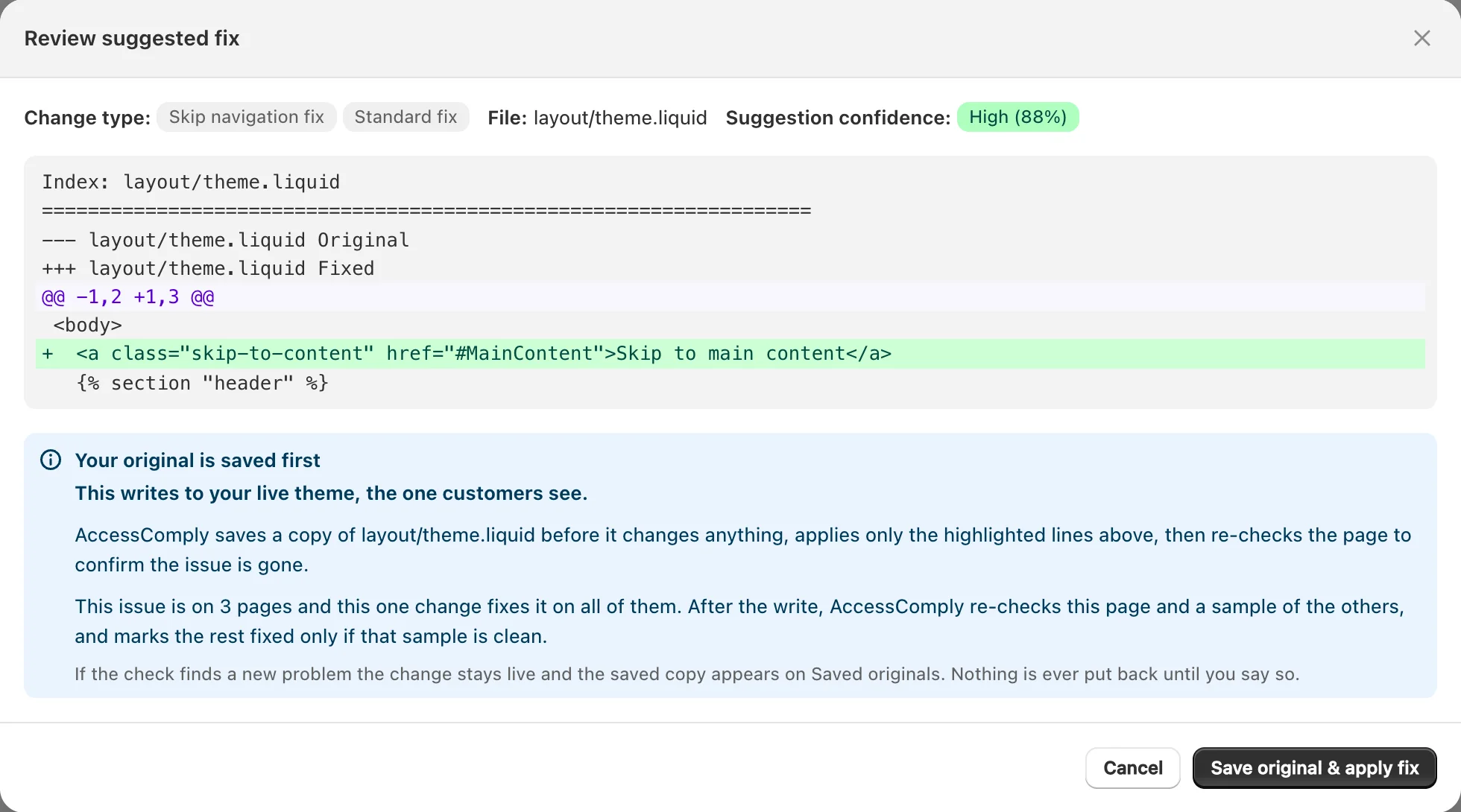
- Form labels, a skip link and the page language
- On Shield and Citadel: AI image descriptions and labels for buttons and links
What stays with you
- Findings inside another app’s widget, named for the app and what to ask it
- Tap targets smaller than 24 by 24 pixels
- Video captions, PDFs and your checkout
- Anything automated rules cannot judge, such as reading order
Speed
Checks the page code for images and scripts that slow a page, on the pages the scan reaches.
What it checks
- Images without a width and height, which shift the page as they load
- Images below the fold that load before a shopper needs them
- The main image not marked as the priority
- Styles that block the first paint, and heavy scripts from apps
What it fixes
- Width, height and loading attributes, where the image tag is written in your theme’s code
What stays with you
- Images a modern theme builds for you, which usually have these already
- Scripts an app loads, which the app controls
- Live shopper speed: this is a check of the code, not a field speed score
Findability
The on page signals search engines read: titles, descriptions, image text and product data.
What it checks
- Missing, short or overlong page titles and descriptions
- Images without a description
- Product structured data, and broken internal or sitemap links
What it fixes
- Titles and descriptions on products, collections and pages, kept within search limits
- On Shield and Citadel: AI image descriptions, saved on the image itself in Shopify
What stays with you
- The home page, blog index and policy pages, which Shopify sets in its own settings (it says where)
- Keyword research, rankings and redirects, which this tool does not do
AI shopping readiness
Whether ChatGPT, Google AI, Copilot and Gemini can reach your store and read the product details Shopify sends them.
What it checks
- Discovery files assistants look for, and whether they can be reached
- Product details Shopify’s catalog shares with AI assistants
- Settings that hide a store from assistants in some markets
What it fixes
- Discovery files that are missing or out of date
What stays with you
- Product facts only you know, such as materials, sizes and care
Every area, one way of working
Approve, save, fix, check.
Whatever found the issue, a change follows the same steps: you approve it, the original is saved, the change is written, and the page is scanned again before it counts.
- Open any single fix to read the exact change first
- Approve every ready fix in one press when you prefer
- Originals saved before each run, and any run undone on your word
- Nothing written to your store without your approval
After the first scan
Monitoring, reports and records.
Scheduled scans
- Starter scans every month, Shield every week, Citadel every day, and any plan can be set to scan less often
- A rescan when your theme changes, on paid plans
- A rescan when products change, on Shield and Citadel
- An email summary after scheduled scans, if you want one
Reports
- A PDF report of every scan, on every plan
- A dated work record of each fix and its follow up check, from Starter
- Developer notes for the issues that are yours to hand over
- Findings mapped to the European accessibility standard where it applies
On your storefront
- An accessibility statement you review, published as a Shopify page
- An optional feedback button for shoppers, read in the app
- Optional helpers for focus rings, tap targets and reduced motion
About the checks
What a scan covers, and what it cannot.
- No. It checks the on page signals, page code and accessibility rules a scan can measure, and fixes what it can place safely. It does not do keyword research, rank tracking, redirects, image compression or live shopper speed scores. Accessibility is its deepest area.
- Up to 50 pages on Free and up to 150 on paid plans (400 with Shopify crawler access), taken across every kind of page: products, collections, content pages and blog posts. Each page is checked at a desktop and a phone width.
- No, and no tool can. Automated rules find a large share of common issues, and a check that cannot decide is not counted as a pass. Some things, such as whether an image description is right or a page reads in a sensible order, need a person. AccessComply lists those rather than claiming them.
- Yes. Reports can map findings to the European accessibility standard used in those reviews. The mapping is for your documentation; it does not decide whether the European Accessibility Act applies to your store or whether it conforms.
See what one scan finds on your store.
Free, no signup, every finding tied to its page. Install when you want the fixes.